Announcement bar for Shopify
Say it on every page
Free shipping, sales and delivery dates, at the top of every page.
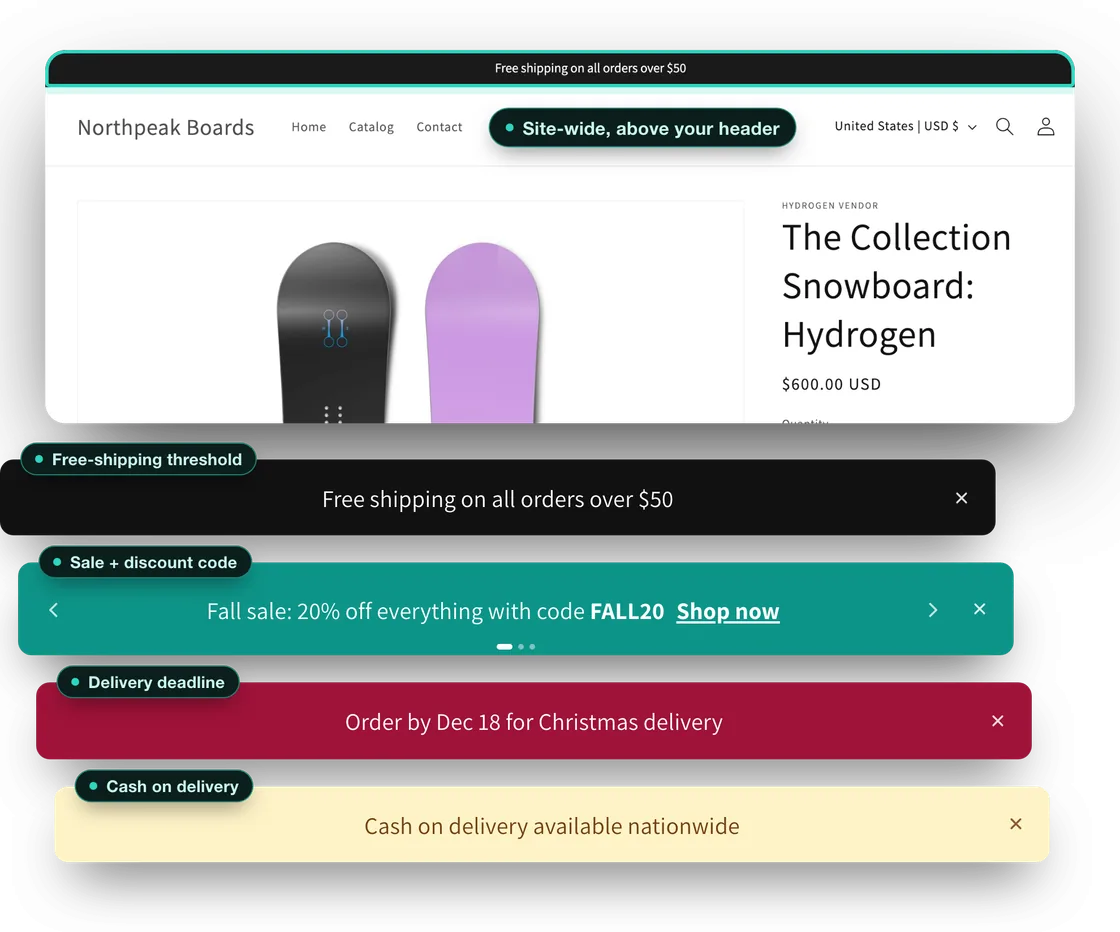
Shoppers land on product pages, not your homepage — so an offer that only lives on the homepage is one most of them never see. The bar puts it at the top of every page, in your colours.
- Free, no paid plans
- No code
- Up to five rotating messages
Part of Store Essentials, our free app for storefront basics. Installing it also gives you Trust Badge and FAQ Accordion — none of them shows on your store until you add it.
Shopify App Store
Free— no paid plans
App embed— switch it on once, it shows on every page
No store data— the app requests no access
Easy to miss
Four things worth saying.
Each one changes whether they buy today. None of them helps if it sits on a page they never open.
Shipping?
Your free-shipping threshold, on every page they browse.
Sale?
The sale and the code, with a link to shop it.
In time?
Your order-by date for the holidays.
Pay how?
Cash on delivery or a local wallet, before they reach checkout.
Features
What you can set
Everything below ships in the app today. Nothing here is a roadmap item.
Up to five messages
Add up to five messages and the bar rotates through them. Each one can link somewhere: a collection, a sale, your shipping page.
Your colours and type
Pick the background and text colour, font size, weight and letter spacing, and uppercase if you want it — so the bar looks like part of your store.
Stays in view if you want
Keep the bar at the top of the screen while shoppers scroll, or let it scroll away with the page.
Shoppers can close it
Let shoppers close the bar, and choose how long it stays closed: for the visit, for seven days, or until you change the message.
On every page, no code
It is an app embed: switch it on once in the theme editor and it shows across your store. Switch it off and it is gone.
FAQ
Your questions, answered
Announcement Bar
How do I turn the announcement bar on?
In the theme editor, open App embeds, switch on Announcement bar and save. The app's home page has a button that takes you straight there.
Can the bar show more than one message?
Yes, up to five. The bar rotates through them at the speed you set, and shoppers can step through them with arrows if you turn those on.
Do I have to use the trust badge and FAQ as well?
They come with the same install, Store Essentials, but stay off your store until you add them. Use only the announcement bar if that is all you need.
What does the bar keep about shoppers?
Only whether a shopper closed it, saved in their own browser so it stays closed. Nothing is sent to us, and the app requests no access to your store's data.
Add the announcement bar free
Install Store Essentials, switch on Announcement bar under App embeds and write your first message. Free, with no paid plans.